Wednesday, July 25, 2012

Hukum Hukum Rangkaian Teknik Elektro

Hukum Kirchoff Arus|Kirchoff tegangan
- Hukum Kirchoff ArusStates that "all the algebraic number of the flow enters a knot / point in the series is a zero" or "the amount of flow that enters the knot in a series with the same amount of flow that is out of the knot."Expressed mathematically withAs an illustration shown in the picture below:So based on the law applicable kirchof...
READ MORE...

Hukum Ohm

Hukum OhmStates that "the voltage across the various types of materials are proportionate with the straight flow of the stream." Mathematically expressed by:Ohm's law formula can be derived as follows:V is the voltage (in volt), I is the current that flows (in ampere) and R is resistansi or obstacles (in ohm, Ω) which is 1 ohm value is equal...
READ MORE...

Arus |Tegangan|Daya||Energi Listrik

Arus listrik|Electric current (I)Electric current states that the number of load flow in a certain direction on a series of electrical elements of each unit of time. Mathematically expressed by:with,I: electric current (in ampere)Q: electric load (in coulomb)t: time (in seconds)Than the electric current magnitude have also have a direction...
READ MORE...

Analisis Nodal/Simpul/Titik -Analisa Rangkain Elektronika

Analisis Nodal/Simpul/Titik Untuk mempermudah Analisa Rangkain ElektronikaNodal / Simpul /titik Analysis By using this method, we will first obtain the size of the voltage on each of a series in which later can be used to explore the amount of electricity the other.Stages to implement a Nodal / Simpul / Titik Analysis is this:1. Determine...
READ MORE...

Tuesday, July 21, 2009

Analisis Loop/Mesh Pada Rangkaian Elektronika

Analisis Loop/Mesh Pada Rangkaian ElektronikaStages to implement the Loop Analysis / Mesh is this:1. Determine the direction of flow in each loop in the series. Usually selected with the clockwise direction.2. Determine the polarity of each element in the series.a. In the source: cash flow from the polarity (-) to the polarity (+)b. In the...
READ MORE...

Transformasi Sumber

Transformasi Sumber When we apply a method to analyze a series of DC, may be necessary to change the source of flow into voltage source or voltage source into a source flow.Not any source can be transformed. A voltage source in series with the new resistans can be transformed into a source of flow in parallel with resistans. Instead of a...
READ MORE...

Teorema Thevenin - Analisis Rangkaian Elektronika

Teorema Thevenin untuk menganalisis Rangkaian DCThevenin theorems states that any two of the series can be converted into an equivalent set of which consists of a voltage source thevenin (ETH) and a resistans equivalent thevenin (RTH) is in series with voltage source thevenin.Steps to find the rope thevenin is:1. Specify two of the series...
READ MORE...

Teorema Norton-Analisis Rangkaian Listrik

Teorema Norton untuk menganalisis Rangkaian listrik DCNorton theorems is that, any two of the series can be converted into an equivalent set of which consists of a current source (IN) and a norton equivalent resistans (RN) with a source flow dipararel it.Steps to find the rope it is:1. Specify two of the series who want to search string...
READ MORE...

This circuit is of a street light that automatically switches ON when the night falls and turns off when the sun rises. In fact you can this circuit for implementing any type of automatic night light. This circuit can be used to control lights or other electrical equipment with large power to hundreds of watts
The circuit used an LDR to sense the light . When there is light the resistance of LDR will be low. So the voltage drop across POT R2 will be high. This keeps the transistor Q1 ON. The collector of Q1(BC107) is coupled to base of Q2(SL100). So Q2 will be OFF and so do the relay. The bulb will remain OFF.
When night falls the resistance of LDR increases to make the voltage across the POT R2 to decrease below 0.6V. This makes transistor Q1 OFF which in turn turs ON Q2.The relay will be energized and the bulb will glow.
 Control Lampu Jalan Dengan LDRSkema rangkaian control lampu jalan dengan LDR

* POT R2 can be used to adjust the sensitivity of the circuit.
* You can use bulb of any wattage ,provided that relay should have the sufficient rating.
* The circuit can be powered from a regulated 9V DC power supply.
* Click Here! to get the power supply circuit for this project.
* The relay K1 can be a 9V SPDT relay.

A bout LDR ( Light Dependent Resistor )

Working principle of LDR is the LDR resistance will change with changes in light intensity about it. In the dark resistance of LDR about 10MΩ and in light of 1KΩ or less. LDR is made from semiconductor materials such as cadmium sulfide. With this material the energy of the light that falls cause more load to the electric current is released or increased. This means that the material resistance has decreased.
LDR ( Light Dependent Resistor )
LDR ( Light Dependent Resistor ) pic
LDR is used to convert light energy into electrical energy. Automatic light switches and burglar alarms are a few examples of tools that use the LDR. However, because the response to light is slow, LDR is not used in situations where the intensity of light changed drastically.

Saturday, July 21, 2012

Cara Kunci Hardisk Supaya Tidak Bisa Di Copy Ke FlashDisk


Cara Kunci Hardisk Supaya Tidak Bisa Di Copy Ke FlashDisk berguna untuk mengamankan file-file yang ada di dalam komputer dari teman atau orang lain yang ingin copy paste file yang ada di komputer kamu. Hal ini bekerja untuk OS Windows SP1,SP2, SP3, Windows Server 2003 and 2008, Vista dan Windows7. Kalau ada yang ingin mencobanya silahkan saja.


Berikut Cara Kunci Hardisk Supaya Tidak Bisa Di Copy Ke FlashDisk :

1. klik start >> run ketik regedit

2. cari HKEY_LOCALMACHINE\SYSTEM\CurrentControlSet\Control

3. di folder CONTROL, Klik kanan -> New -> Key
terus namain folder baru itu -> "StorageDevicePolicies"

4. lalu di folder "StorageDevicePolicies", Klik kanan > New > Dword (32-bit)

5. key yang baru itu namain : "WriteProtect"

6. klik 2x Key WriteProtect-nya, trus ganti Value Data jadi 1


Untuk mengembalikannya menjadi normal kembali tinggal edit saja Value Data dari key yang namanya "WriteProtect" itu jadi 0 (nol)

Friday, July 20, 2012

Software Gratis Alternatif pengganti DeepFreeze

Software Gratis Alternatif pengganti DeepFreeze

 
Bagi sebagian besar kita mungkin tidak asing lagi dengan program/software yang satu ini, DeepFreeze. Merupakan salah satu software yang cukup populer untuk proteksi komputer dari berbagai masalah (virus, malware, error installasi program dsb). Teknik yang digunakan adalah dengan mengembalikan sistem komputer ke keadaan sebelumnya setelah restart.
DeepFreeze merupakan program berbayar, jika kita ingin mendapatkan fitur sejenis tetapi dengan program gratis, berikut altenatifnya.

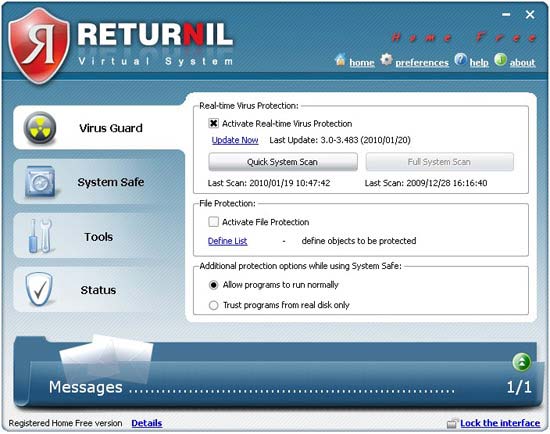
Returnil Virtual System (RVS) 2010 Home Free

RVS 2010 merupakan software kombinasi antara antivirus, anti-malware dan virtualisasi sistem yang bertujuan untuk melindungi komputer dari berbagai serangan/infeksi virus dan sejenisnya. RVS 2010 Home Free bisa kita gunakan grais untuk personal dan non-commercial.

Berikut beberapa fitur RVS 2010 Home Free :
  • Virus Guard, Antivirus yang memonitor secara realtime (terus menerus)
  • Sistem safe (virtusl sistem), untuk mengembalikan keadaan komputer seperti sebelunya. Seperti halnya DeepFreeze.
  • Virtual Disk, mampu membuat virtual disk/partisi.
  • Access Protection, untuk menjaga komputer dari penggunaan yang tidak di inginkan
  • Message Center, memberikan berbagai informasi berkaitan dengan keamanan/infeksi virus.
  • Berbagai fitur lainnya
Salah satu fitur yang merupakan alternatif DeepFreeze adalah kemampuan untuk mengembalikan keadaan sistem seperti sebelumnya. Jadi ketika komputer sudah terinfeksi virus, maka komputer bisa dikembalikan ke keadaan sebelumnya. Data atau Update yang sudah tersimpan pun akan terhapus jika dilakukan recovery, sehingga pastikan untuk menon-aktifkan terlebih dahulu RVS 2010 ketika melakukan update dan perubahan penting lainnya.
Lebih detailnya silahkan melihat halaman Returnil Virtual System 2010 Home Free
Download RVS 2010 Free( 33.1 MB)

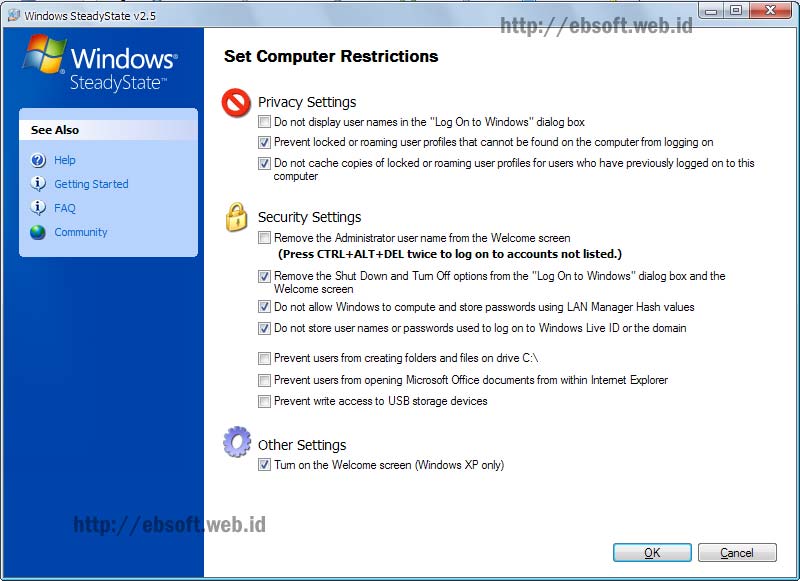
Windows SteadyState

Sebagai pembuat Sistem operasi, Microsoft pun tidak ketinggalan memberikan software untuk proteksi sistem yang mempunyai fitur seperti deepfreeze. Meskipun sederhana fitur yang sudah di integrasikan (system restore) menyediakan fitur ini, tetapi tidak jarang system restore malah digunakan virus untuk menggandakan diri.

Windows SteadyState yang sebelumnya bernama Shared Computer Toolkit, di design dengan fitur-fitur seperti berikut :
  • Mengatur komputer sharing lebih mudah dan aman
  • Mengunci user interface, sehingga lokasi penting tidak dapat diijinkan di akses oleh user tertentu.
  • Mengembalikan komputer ke keadaan sebelumnya setelah restart.
Fitur terakhir ini yang mirip dengan DeepFreeze. Ketika Disk Protection diaktifkan, akan membuat semacam cache file dan memantau setiap perubahan sistem operasi atau direktori program. Pada interval yang bisa ditentuan cache ini bisa dihapus dan mengembalikan keadaan komputer seperti sebelumnya. Download software ini berlaku untuk pengguna Windows XP atau Vista Original
Download dan Informasi selengkapnya : Windows SteadyState

Tip Mengamankan Sistem Operai berbasis Windows

Dibawah ini saya tuangkan beberapa cara atau tip bagaimana cara mengamankan komputer yang menggunakan sistem operasi Win XP atau Win 7, mudah-mudahan menjadi bermafaat buat kita semua, namun tulisan ini gak menjadi 100% aman, karena banyak sekali hacker-hacker kecil khususnya di kota Tangerang, yang pintar bermain hacking dan cracking, sebagai contoh, mereka bisa menjebol OS berbasis windows yang dipasang deepfreeze versi terbaru pun masih bisa dijebol........, 

1. Menggunakan Password BIOS
Cara ini merupakan cara yang aman, karena dapat memproteksi computer agar tidak bisa dipergunakan seenaknya oleh orang lain, selain itu, password bios akan memproteksi pengaturan-pengaturan yang berisi informasi salah satunya mengenai BIOS. Jika komputer anda sudah terpasang deep freeze, cara ini sangat lah berguna karena jika seseorang ingin melakukan hacking terhadap deep freeze maka orang itu akan menemui hambatan, karena BIOS sudah terpasang password.
2. Aktifkan firewall
Firewall memiliki peran yang sangat penting dalam keamanan sistem operasi, karena firewall sendiri untuk me-remote port-port yang terbuka, karena pada umumnya port yang terbuka akan menjadi jalan masuk bagi si hacker, virus, spyware, dll apalagi jika port-port itu tidak terproteksi.
3. Matikan service yang tidak diperlukan
Tujuannya ialah meminimalisir ancaman-ancaman yang mungkin terjadi, karena biasanya suatu program jahat akan membuat service tersendiri yang akan berjalan secara otomatis ketika computer dihidupkan.
4. Gunakan NTFS pada harddisk
Hal ini dilakukan agar anda sebagai administrator dapat menggunakan fasilitas permission untuk mengatur user dalam hal pembatasan hak akses. Fasilitas permission ini hanya di dapat jika menggunakan NTFS, jika menggunakan FAT atau FAT32 mungkin tidak ada.
5. Gunakan AntiVirus terbaru
Sepertinya ini sudah tidak asing lagi, namun biar begitu peran antivirus sendiri amatlah penting, karena pada dasarnya cara kerja antivirus ini akan memfilter file, proses di task manager, email, website berbahaya, hingga mendeteksi ancaman-ancaman lain yang tidak kita ketahui. Biasanya antivirus terbaru akan memiliki fasilitas tambahan, seperti spyware, rootkit, link scanner, email protection serta identity protection.
Hmm..saya rasa hanya segitu, jika ada lagi saya akan menambahkannya lagi..
Untuk yang kedua, ini akan membahas tentang cara mengamankan sistem operasi Windows 7
1. Gunakan Windows Defender
Windows defender sudah ada ketika menginstal windows, namun kita pastikan apakah sudah aktif apa tidak. Manfaat dari windows defender ini antara lain mencegah spyware & virus yang akan menginfeksi sistem operasi serta mencegah software berbahaya.
2. Aktifkan UAC
Tujuan dari UAC atau User Account Control ini akan meminta  izin kepada anda sebagai Administrator sebelum menginstal perangkat lunak atau membuka jenis program tertentu yang berpotensi membahayakan computer Anda atau membuatnya rentan terhadap ancaman keamanan.
3. Backup
Ini bertujuan mengamankan file-file serta dokumen penting lainnya dari bahaya di masa akan datang yang kemungkinan akan terjadi kehilangan atau kerusakan pada file file tersebut yang diakibatkan oleh virus, program error maupun human error itu sendiri.
4.Aktifkan Firewall
Ini sama pentingnya dengan sistem operasi windows XP. Firewall ini untuk membantu mencegah hacker dan perangkat lunak berbahaya yang tidak diinginkan. Biasanya perangkat lunak ini diam-diam mengakses internet untuk mengirimkan hasil data-data curian kepada si pembuat software.
5. Matikan fasilitas Automatic Updates
Jika anda menggunakan Windows bajakan, ada baiknya untuk mematikan fasilitas Automatic Updates ini, namun saya sarankan agar menggunakan Windows asli, selain menguntungkan juga dapat up to date mengenai security windows serta update-update terbaru dari microsoft.